


What happens when a recruitment advertisement campaign goes live isn’t new: money flows out, while applications flow in. Except this doesn’t always happen the way hiring managers want it to. Perhaps too much money goes toward unfit channels, or CVs pile up faster than anyone can read through them.
For staffing agencies, these inefficiencies aren’t small either. They spread across dozens of campaigns and multiple recruiters – sometimes even multiple branches and clients as well. This makes getting a hold of the whole operation while protecting budgets (and margins) difficult without adequate controls in place.
This is why we’ve launched two Hirematic features around one core idea: Giving hiring teams the ability to set limits, controlling what they spend and receive. Together, these bring structure to both ends of every hiring campaign.
Our newest features include:
Credit & Spend Management: Control Over What Goes Out
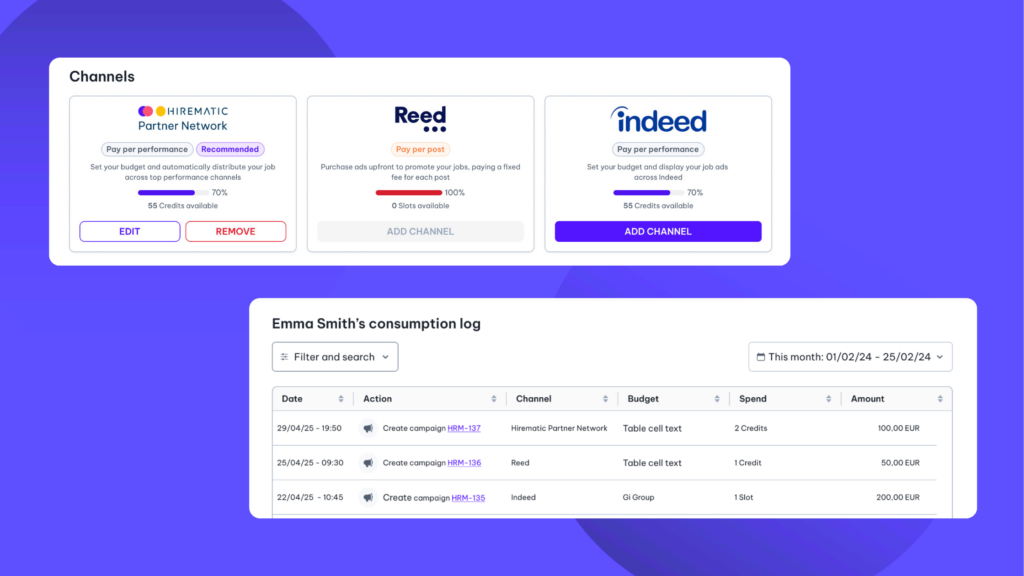
If you’re managing a team of recruiters and wondering where your budget is going or how your recruiters are burning through credits, this feature is for you. You can now set limits on your team’s publishing activity and spend directly from your Hirematic dashboard.
There are two ways to use this new feature:
- Credit / slot limit: Cap how many times a recruiter can post on any given channel. For example, up to 5 posts on Indeed per month. This keeps publishing volume predictable, recruiter by recruiter.
- Budget limit: Set the maximum total budget you can allocate across all your campaigns on a given channel. For example, you can allocate up to €1,000 in total across all campaigns on the Hirematic Partner Network. Once that ceiling is reached, you can't allocate any more budget to campaigns on that channel.
For Agencies and Multi-Recruiter Teams
The real impact comes from the granularity of these limits, as they can be set company-wide, by region, or by individual branch. This means a head office can establish boundaries across every level before anyone clicks publish. Each location has its own budgets and managers can oversee everything through the consumption log. No more micro-managing recruiters or chasing them for explanations after money has been spent.
The result is spend that’s predictable, accountable, and traceable – without the handholding.
CV Limits per Job Advertisement: Control Over What Comes In
If we flip the campaign around, there’s a second tap that’s just as worth controlling: the applications arriving in your inbox.
Some jobs are more popular than others – and you’ll know when you suddenly have three hundred CVs to go through without the recruiter bandwidth to do them all justice. This is when a campaign ceiling for CVs becomes useful.
With Hirematic’s new CV limits, you can control exactly how many CVs a job brings in. Both options work at the job level, and you can choose between two approaches:
- Campaign limit: Set a total application cap for the job. Once that job reaches the number, only that specific job is paused – it stops receiving CVs and stays paused until you manually reactivate it. This gives you a fixed number of CVs and nothing more.
- Rolling period limit: Set a daily or weekly cap instead. Once the job hits the limit for the current period, it automatically stops receiving CVs until that period ends, then resumes in the next one. For example, with a cap of 8 CVs per week, the job pauses as soon as you've received 8 CVs that week and reactivates automatically when the new week begins. This brings in a steady stream of candidates over time rather than all at once.
For Every Hiring Team, Big or Small
Whether you’re a single hiring manager filling one role or a team running many, controlling the volume of CVs keeps your pipeline steady and your team focused on the candidates in front of them, without needing to step in and pull ads down if CVs are close to overflowing.
Both features are live in your Hirematic dashboard now. Just set your limits once, then let Hirematic optimise campaigns within these limits automatically.
Control on Both Ends of Every Campaign
Recruitment advertising works best when your boundaries are in place. With spend management and CV limits working together, you set the ceiling on what goes out and the cap on what comes in – with every campaign running inside those lines. No overspending on the wrong channels, and certainly no buried CVs that no one has time to read.
Both features are live in your Hirematic dashboard now. Just set your limits once, then let Hirematic optimise campaigns within these limits automatically.
